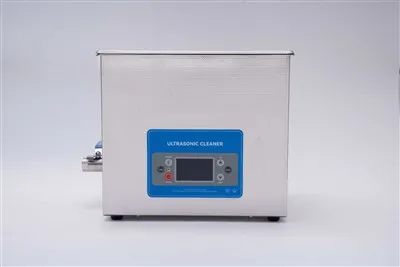
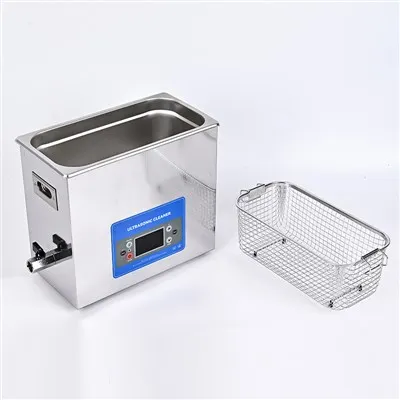
As a supplier of ultrasonic auto parts cleaners, I've encountered numerous common issues that users face. In this blog, I'll share practical troubleshooting steps to help you resolve these problems effectively.


No Power
- Check the Power Source: The first thing to do when your ultrasonic auto parts cleaner doesn't turn on is to check the power source. Ensure the cleaner is properly plugged into an active power outlet. Sometimes, a loose connection can be the culprit. You might also want to test the outlet with another device to confirm its functionality. If the outlet is working fine, but the cleaner still doesn't power up, move on to the next step.
- Inspect the Power Cord: Examine the power cord for any visible signs of damage, such as cuts, frays, or exposed wires. A damaged cord can disrupt the electrical flow and prevent the cleaner from receiving power. If you find any issues with the cord, it should be replaced immediately. You can usually purchase a replacement cord from the manufacturer or a reputable electronics store.
- Check the Fuse: Many ultrasonic cleaners are equipped with a fuse for safety reasons. Locate the fuse on the cleaner, usually in the power cord plug or on the back of the unit. Use a multimeter to test the fuse for continuity. If the fuse is blown, replace it with a new one of the same rating. This simple fix can often restore power to the cleaner.
Weak Ultrasonic Cleaning Effect
- Verify the Cleaning Solution: The type and concentration of the cleaning solution can significantly affect the ultrasonic cleaning performance. Make sure you're using a cleaning solution recommended by the manufacturer. Using the wrong solution or an incorrect concentration can reduce the cleaning efficiency. If necessary, drain the old solution and replace it with the appropriate one at the recommended concentration.
- Check the Water Level: The water level in the cleaning tank is crucial for the ultrasonic waves to work effectively. If the water level is too low, the ultrasonic waves may not be able to propagate properly, resulting in a weak cleaning effect. Refer to the user manual for the correct water level and adjust it accordingly.
- Inspect the Transducers: The transducers are the components that generate the ultrasonic waves. Over time, they can become coated with debris or damaged, which can reduce their efficiency. Inspect the transducers visually for any signs of damage or buildup. If there is debris on the transducers, carefully clean them using a soft brush and a mild cleaning solution. If the transducers are damaged, they may need to be replaced by a professional technician.
Overheating
- Check the Ventilation: Ultrasonic cleaners generate heat during operation, and proper ventilation is essential to prevent overheating. Ensure that the cleaner is placed in a well - ventilated area, away from walls, curtains, or other objects that may block the airflow. Make sure the ventilation openings on the cleaner are not obstructed.
- Limit the Operating Time: Continuous operation for long periods can cause the cleaner to overheat. Refer to the user manual for the recommended maximum operating time and allow the cleaner to cool down in between cycles. If you need to clean a large number of parts, it's better to divide the cleaning process into shorter intervals.
- Inspect the Cooling System (if applicable): Some larger ultrasonic cleaners are equipped with a cooling system. Check the cooling fan or radiator (if present) for any blockages or malfunctions. Clean the cooling components regularly to ensure proper heat dissipation.
Unusual Noise
- Check for Loose Parts: Over time, the vibrations from the ultrasonic cleaning process can cause parts inside the cleaner to become loose. Open the cleaner (if possible and following safety procedures) and inspect for any loose screws, brackets, or other components. Tighten any loose parts that you find.
- Examine the Cleaning Tank: If the cleaning tank is not properly seated or has been damaged, it can cause unusual noise. Check the tank for cracks or dents. Make sure it is securely placed on the base of the cleaner. If the tank is damaged, it may need to be replaced.
- Verify the Ultrasonic Frequency: In some cases, an incorrect ultrasonic frequency can lead to unusual noise. Refer to the user manual to ensure that the cleaner is set to the correct frequency for the type of parts you are cleaning.
Other Resources
If you're interested in other types of ultrasonic parts cleaners, we offer a range of products to meet your needs. For firearm maintenance, check out our Ultrasonic Gun Parts Cleaner for Firearm Maintenance. If you're a DIY enthusiast, our DIY Ultrasonic Parts Cleaner might be the perfect option. And for those looking for a fast - heating fuel injector cleaner, take a look at our Fast - heating 2L Ultrasonic Fuel Injector Cleaner With Stainless Steel Basket.
Contact for Purchase
If you're experiencing problems with our ultrasonic auto parts cleaners that you can't resolve on your own, or you're interested in purchasing a new cleaner, don't hesitate to contact us. We're here to provide you with professional advice and solutions to meet your cleaning needs.
References
- Manufacturer's user manuals for ultrasonic auto parts cleaners
- Industry knowledge on ultrasonic cleaning technology